What is Roame?
One of the hardest parts of booking a flight with points is figuring out where to begin. You might have miles with one airline, credit card points with another program, and no idea which offers the best deal for your trip.
Roame is designed to make that easier. It searches more than 25 airline loyalty programs, compares the award flights, and lets you explore different destinations. Its interface is clean and easy to follow, which makes it a good fit for people who know ordinary flight-search websites but haven’t booked many award tickets.
How does Roame work?
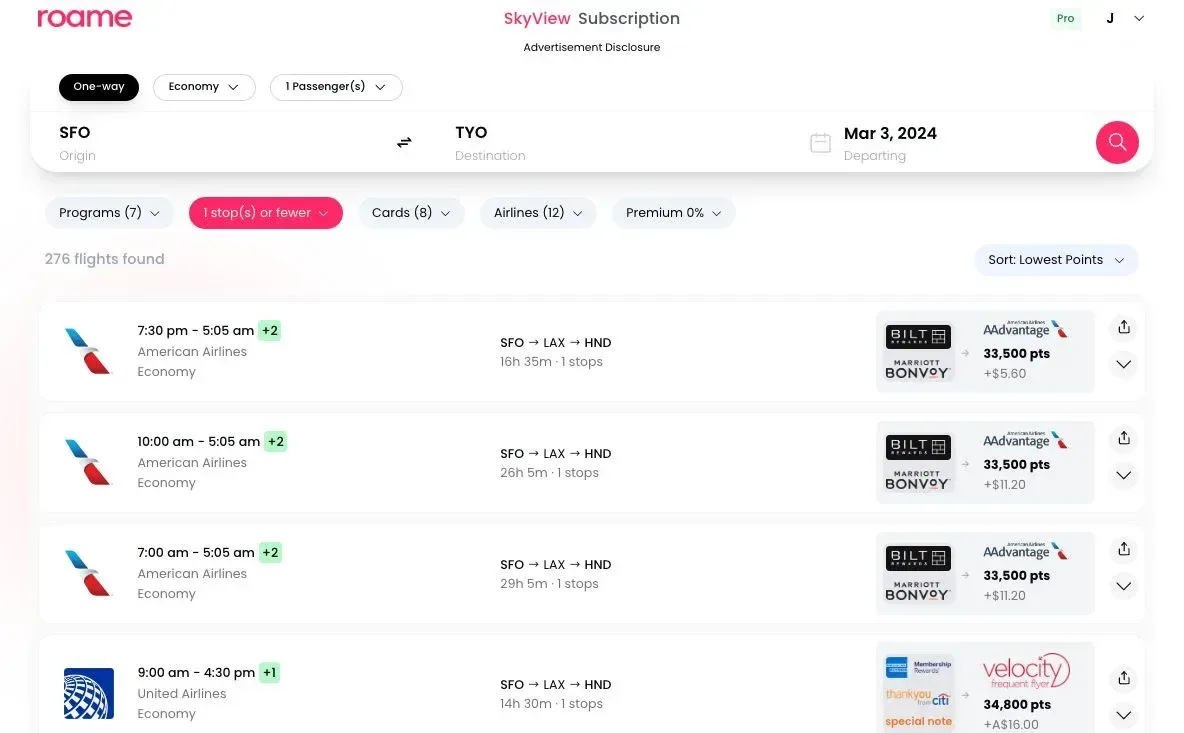
- Enter your trip. Your departure city, destination, travel date and cabin: economy, business or first.
- Read the results. You see the operating airline, the route and connections, the points required and the taxes and fees. A calendar along the top shows the lowest price each day.
- Narrow them down. Filter by stops, program, the bank points you have, the share of the trip in a premium cabin, maximum fees and maximum points. If you only want nonstops, remove the connections.
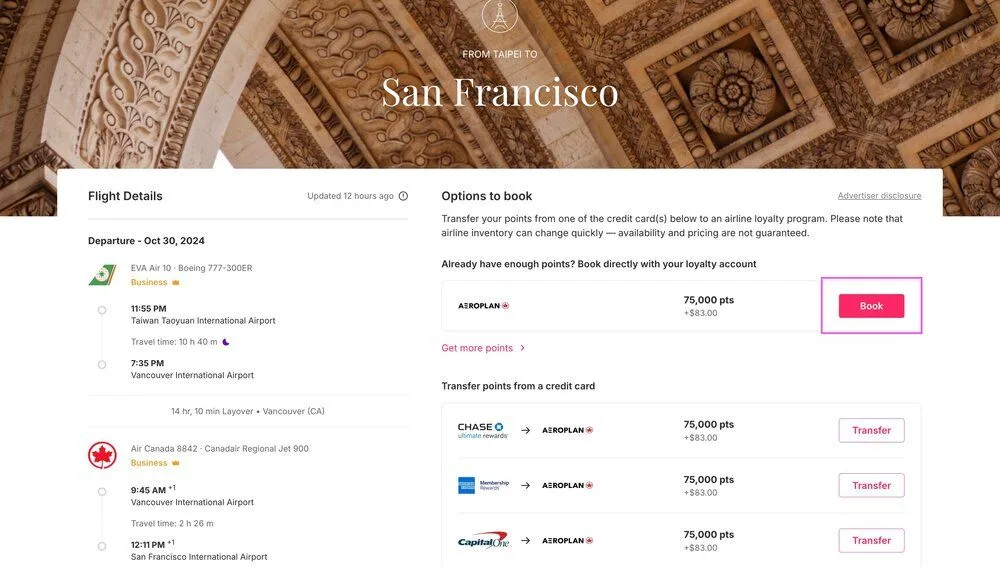
- Choose how to pay. Click “Transfer” next to a program for step-by-step instructions on moving points and booking.
- Book with the airline. Roame doesn’t book for you; you finish on the program’s website.
A real example: the US West Coast to Tokyo
Roame’s own guide to searching award flights looks for a way from the US West Coast to Tokyo. It is a good route to learn on, because there are many ways to get there: nonstops and connections, on Japanese and American airlines, sold by several programs.
In that search, the cheapest option Roame found was Seattle to Tokyo Haneda, booked through Virgin Atlantic Flying Club. Someone searching only one airline’s website would never have seen it.
Two lessons come out of an example like this. A connecting flight might need fewer points but take several hours longer, so look at the whole itinerary, not just the price. And the airline flying the plane is not always the airline whose miles you need.
The flights in this example show how the tool works. They are not proof that those seats are available today. Always check the airline’s own website before you transfer points.
What is SkyView?
A normal search starts with one route and one date. SkyView is for broader searches. Say you live in New York and want to visit Europe sometime in the spring, and you are open to London, Paris, Rome or somewhere else. Instead of searching each city, SkyView searches whole regions across a range of dates.
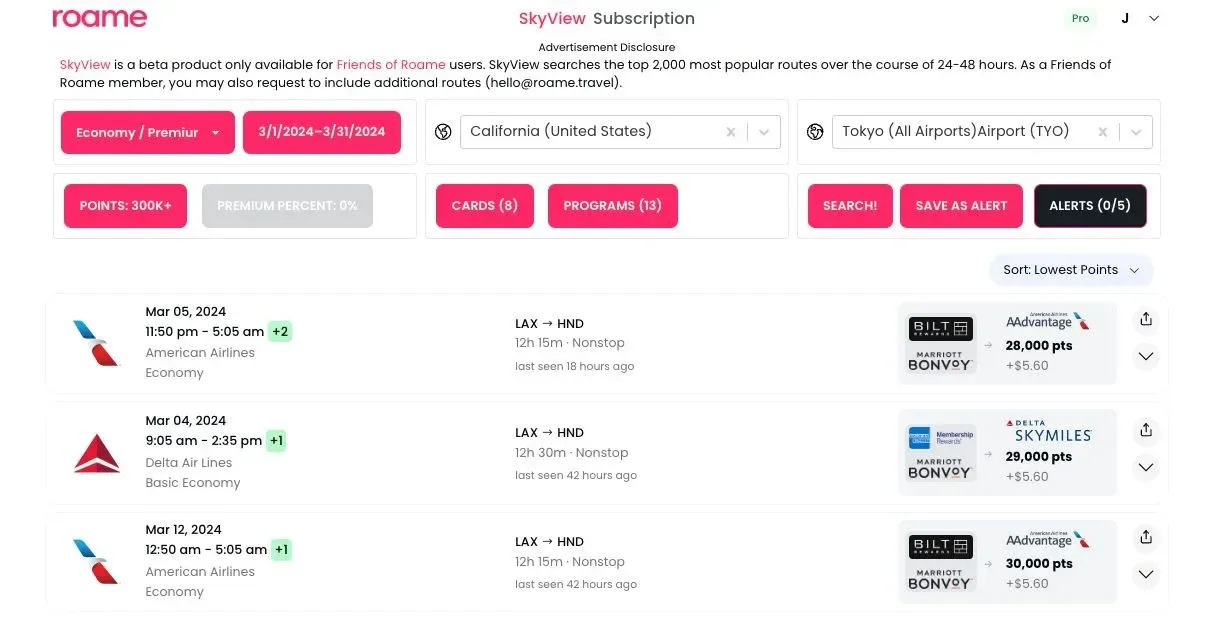
The free version, SkyView Lite, searches a seven-day window for flights departing within the next 60 days. That does not mean the whole 60 days in one go: the seven-day window is the limit. Paid plans widen the window to 60 or 180 days across the full year.
SkyView uses saved results. Roame refreshes popular routes once a day, so a result can be hours or days old. Roame itself recommends confirming a SkyView find with a live search, and then on the airline’s site, especially before transferring points.
Alerts
Say you want business class from San Francisco to Tokyo for cherry blossom season and nothing good shows up today. On a paid plan you can set an alert from SkyView, and Roame notifies you by email, app or text when matching seats appear. Super Alerts can watch whole regions and stay on until you turn them off.
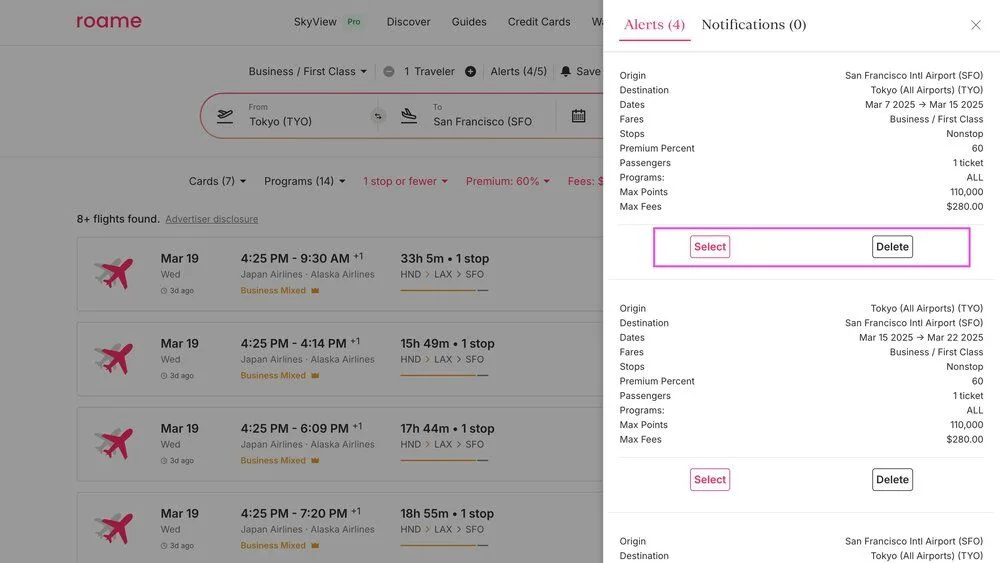
An alert doesn’t hold the seat. When one fires, check the flight and book it while it’s there.
Free and paid plans
Free
$0
- Live search with a 4-day flexible window
- SkyView Lite: 7-day window, departures within 60 days
- Points wallet and deal emails
Friends of Roame
$109.99 a year
- Live search up to 365 days ahead, 8-day window
- Up to 3 airports per search
- SkyView with a 60-day window
- 10 multi-region Super Alerts, SMS alerts
Inner Circle
$299.99 a year
- Everything in Friends of Roame
- Up to 4 airports per search
- SkyView with a 180-day window
- 100 Super Alerts
Annual prices checked on Roame in November 2026. Monthly billing is also offered. Check Roame for current prices.
What we like
- An approachable design that feels like an ordinary flight search.
- SkyView is excellent when the destination is flexible.
- Clear transfer and booking instructions on each result.
What could be better
- Broader SkyView searches and alerts need a paid plan.
- Not every airline program is covered.
- Saved SkyView results may no longer be bookable.
- For a specific upgrade or fare class, a specialist tool such as ExpertFlyer is better.
Who should use Roame?
Roame balances an approachable interface with useful advanced features. It is a good fit if you want an easy search, or if you are flexible about where you go and want to compare different ways to use your points.
It is a strong choice for exploring several destinations at once instead of searching one route at a time.